
Easy On Hold® for NEC SL2100
Streaming music and messages for the SL2100's external music-on-hold input.

Music On Hold for the NEC SL2100
The NEC SL2100 is an on-premises business phone system with an external music-on-hold option. Easy On Hold® brings licensed music and custom messages to that input through a 2-Channel Business Audio System (2CBAS). The player receives the managed audio stream and supplies an analog signal to the SL2100.
With the connection established, your team can choose music, schedule announcements and turn messages on or off in the Easy On Hold Content Control Center™. Routine content updates do not require a new PBX audio file or a change to its external audio wiring.
What you get:
- Licensed streaming music and professionally produced messages.
- Content scheduling and message control through the Easy On Hold portal.
- A dedicated audio player that connects to the SL2100's external MOH input.
- Coordination with your NEC installer to test the actual caller experience.
Connect Easy On Hold Audio to the NEC SL2100
Identify the External Audio Interface
Have your NEC installer confirm the installed interface card and locate its audio-in port. NEC's installation guide covers the IP7WW-308U-A1 and IP7WW-082U-B1 cards.
Connect the Business Audio System
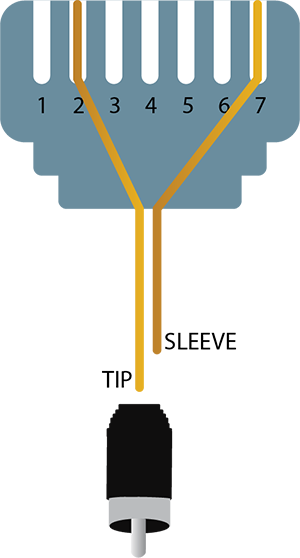
Connect an appropriate analog output from the Easy On Hold 2CBAS to the SL2100 audio-in connection. The NEC guide identifies RJ45 pins 2 and 7 for external MOH/BGM; the custom RCA-to-RJ45 cable shown below follows the Easy On Hold connection diagram. Your installer should check the connector and level before use.
Select External MOH in the PBX
In SL2100 PCPro, select the MOH interface in Chassis View, choose the external music device and assign the slot containing the interface card. NEC also documents internal tone and VRS message options.
Test, Then Manage Content Online
Place a live test call and verify the audio heard on hold. Then manage your music and messages through the Easy On Hold Content Control Center without changing the SL2100 source for each update.
Custom RCA-to-RJ45 Audio Cable
NEC identifies RJ45 pins 2 and 7 as the external MOH/BGM input on the supported interface cards. The Easy On Hold cable illustration maps pin 2 to the RCA tip and pin 7 to the RCA sleeve. The NEC guide specifies a high-impedance input (greater than 10 kOhms), a nominal input of 250 mV and a maximum of 1 V RMS. Have your installer verify the card, cable, port and playback level before connecting the player.
The SL2100 also supports an internal VRS message as a hold music source. If you prefer an uploaded file, ask your NEC installer about that separate workflow. The external audio approach is designed for ongoing streamed music and message changes.
Refresh what callers hear on your NEC SL2100.
Bring your NEC installer and communications team. We'll review the external audio connection and your content plan together.
Frequently Asked Questions
Answers about the external audio connection and ongoing message updates.
Yes. NEC documents an External MOH option. A compatible interface card accepts audio from an external player, which an installer then selects as the music-on-hold source.
NEC's music-on-hold installation guide identifies the IP7WW-308U-A1 and IP7WW-082U-B1 interface cards. Your installer should confirm the card installed, its audio-in port and the correct configuration for your system.
No. The RJ45 audio-in connector carries an analog audio signal from the Easy On Hold player. The player receives the managed stream, then feeds audio to the SL2100's external music-on-hold input.
Yes. Once the external audio source is connected and configured, you can manage the music and message schedule in the Easy On Hold Content Control Center without changing the SL2100 connection for each content update.
Get Info & Request a Demo
Tell us a little about your business and we'll show you how Easy On Hold can improve your NEC SL2100 caller experience.