
Easy On Hold® for FreePBX
The future-ready MOH solution

Free PBX Streaming Music On Hold Integration
There's a cure for repetitive, outdated, boring default music on hold: FreePBX streaming music on hold from Easy On Hold® delivers live, licensed audio that keeps your callers engaged. Easy on Hold® created the first streaming music on hold service in 2013, helping IT teams, technicians, and contact centers provide dynamic, continuously updated caller experiences.
Streaming MOH is a simple, reliable upgrade that keeps your FreePBX system current. No file uploads, no loops, and no downtime.
Easy on Hold® streams work directly with FreePBX music on hold and Asterisk-based systems. Instead of static MP3 files, you can use a live HTTPS stream that updates automatically through the Content Control Center™.
- 100% legal, licensed for business use
- No repetitive loops—music plays continuously in randomized order
- Schedule updates by time of day, day of week, or even season
- Manage all streams and messages remotely via the Content Control Center™
- Integrates easily with Asterisk, FreePBX, and many other UC platforms
How to set up a custom hold music stream in FreePBX
Receive and test your stream URL
Receive a music on hold stream URL from Easy On Hold®. It will look like this (shown: demonstration, not a functioning stream): http://eoh-prod-9-ns.easyonholdcloud.com/25d56c9f75dc4cc49214806c5d8621f1
Test the stream URL in a browser to ensure audio plays.
Add a Streaming Category
- Under Settings select Music On Hold
- Choose Add Streaming Category
- In the field for Category Name - type Easy On Hold Stream to name the category
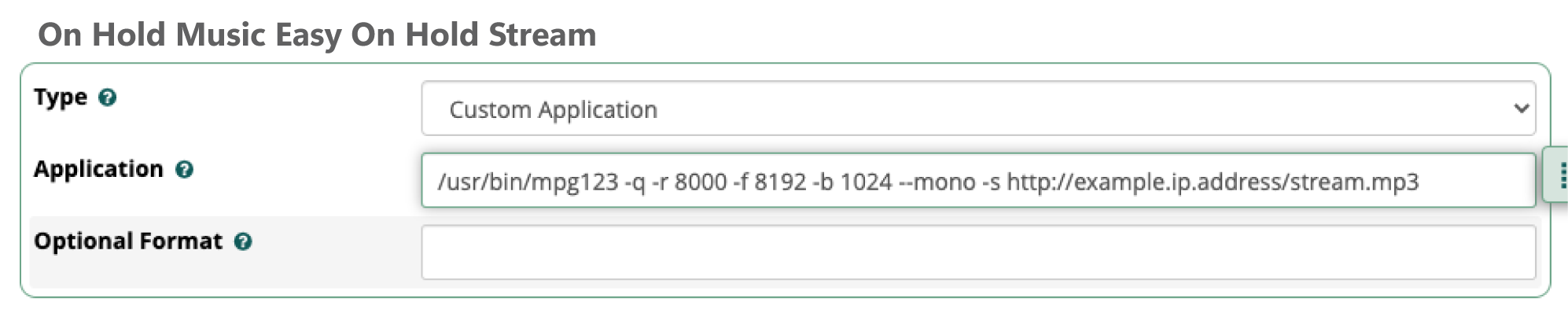
- In the Type field, choose Custom Application

Enter the mpg123 stream command
Edit the new category. On the edit page you will enter the following parameters, including the stream URL. Example:
/usr/bin/mpg123 -q -r 8000 -f 8192 -b 1024 --mono -s http://eoh-prod-9-ns.easyonholdcloud.com/25d56c9f75dc4cc49214806c5d8621f1
- Submit Settings
- Leave Optional Format blank
Apply to Call Queue(s) and test
When setting up a Call Queue or editing an existing Call Queue, the new category for the stream will be selectable from the dropdown. Select it and Submit the settings.
- Click Apply Config
- Call the queue to test

Once configured, your system will stream music on hold FreePBX directly from the Easy On Hold® live, updating automatically with no manual uploads required. Instructions found at FreePBX.org
Upgrading mpg123 for HTTPS
FreePBX natively uses mpg123 for streaming hold music and messages. Please check for the latest version of mpg123 to utilize HTTPS.
Upgrade Options
- Download the latest mpg123 source code from the official website and install the newest version on your platform.
- Upgrade to FreePBX 17, which supports HTTPS natively on its Debian-based build.
- Easy On Hold® can provide a non-secure http stream or HTTPS stream option.
A Better Way to Manage Caller Audio
Streaming Hold Music vs. Audio Files
When a phone system supports a live audio source, streaming makes it easier to keep music and messages current. File-based audio remains a useful option for systems that require uploads.
Get Info & Request a Demo
Tell us a little about your business and we’ll show you how Easy On Hold can elevate your customer experience.