
Easy On Hold® Streaming Music for Cisco CUCM
Give held callers continuous music and timely messages through a managed stream, an on-premises RTP source and Cisco Unified Communications Manager.

Continuous Music and Messages for Cisco CUCM
Give callers a better experience with fresh music and timely messages whenever they are placed on hold. Easy On Hold® streams a continuously playing program to Cisco CUCM, while authorized users can update or schedule content without repeatedly replacing audio files.
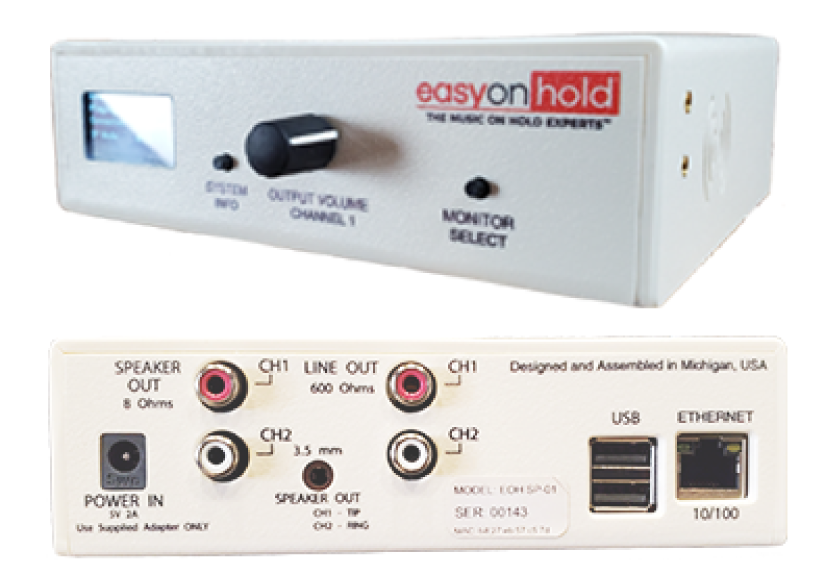
The Easy On Hold 2-Channel Business Audio System (2CBAS) is a compact on-premises appliance that receives a managed HTTPS audio stream and converts it to multicast RTP for CUCM. CUCM uses the external multicast source as a Music On Hold resource and can rebroadcast it as unicast audio for endpoints that require unicast reception in supported configurations.
Higher Caller Satisfaction is Built In
Callers join a live program already in progress instead of repeatedly hearing the opening seconds of the same file. Authorized users manage music, messages, priorities and scheduled start and stop dates in the Easy On Hold Content Control Center™, while the established CUCM media-source configuration remains stable.
For organizations already using the Easy On Hold Streaming Queue Music™ virtual appliance, SQM can also provide a CUCM multicast RTP stream. Easy On Hold and the customer’s Cisco administrator determine whether the dedicated 2CBAS device or an existing SQM deployment is the better implementation path.
How Cisco CUCM Streaming Music On Hold Works
Plan the CUCM Music On Hold Source
Confirm the CUCM release, Music On Hold server design, codec requirements, caller capacity and resiliency objectives. Reserve the multicast source address and an approved even-numbered RTP/UDP port with the Cisco and network teams.
Install and Connect the Local Appliance
Place the 2CBAS on the customer network using a wired connection when practical. Provide its static IP settings and the outbound DNS, network-time and web connectivity required to retrieve the assigned Easy On Hold stream and authorized configuration updates.
Configure the External Multicast Source
In Cisco Unified CM Administration, configure the Music On Hold Audio Source to rebroadcast the external multicast source. Enter the approved source IPv4 multicast address and port, then make the source available through the appropriate media-resource configuration.
Assign, Test and Confirm Failover
Assign the source to the intended devices, device pools or calling scenarios and test user hold, network hold and endpoint coverage. Interrupt the upstream stream during commissioning to confirm that locally stored audio plays and that live streaming resumes automatically.
Cisco CUCM Streaming Music On Hold FAQs
Common questions about continuous managed audio and the on-premises RTP source for CUCM.
The on-premises Easy On Hold 2-Channel Business Audio System receives a managed HTTPS audio stream and converts it to a multicast RTP source for CUCM. The Cisco Music On Hold server then makes that source available to held callers according to the customer’s media-resource design.
Not necessarily. In supported configurations, CUCM can receive an external multicast Music On Hold source and rebroadcast it as unicast audio for endpoints that require unicast reception. The final network and media-resource design should be approved by the customer’s Cisco administrator.
The 2CBAS can play preconfigured audio stored locally while it continues monitoring for the managed stream. When connectivity is restored, the appliance automatically resumes the live Easy On Hold stream.
No. After the external source is configured, authorized users manage routine music and message changes in the Easy On Hold Content Control Center. Content can change immediately or on a schedule without replacing the established CUCM source configuration.
Yes. An Easy On Hold Streaming Queue Music virtual appliance can also provide multicast RTP to CUCM. Easy On Hold and the customer’s Cisco team determine whether 2CBAS or an existing SQM deployment best fits the environment.
Get Info & Request a Demo
Tell us about your Cisco CUCM environment and we’ll show you how Easy On Hold can improve the caller experience.