
Easy On Hold® for Bicom Systems
Bring high-quality, cloud-managed music and messages directly into Bicom Systems PBXware with a live stream URL.

Bicom Systems Streaming Music On Hold and Queue Messages
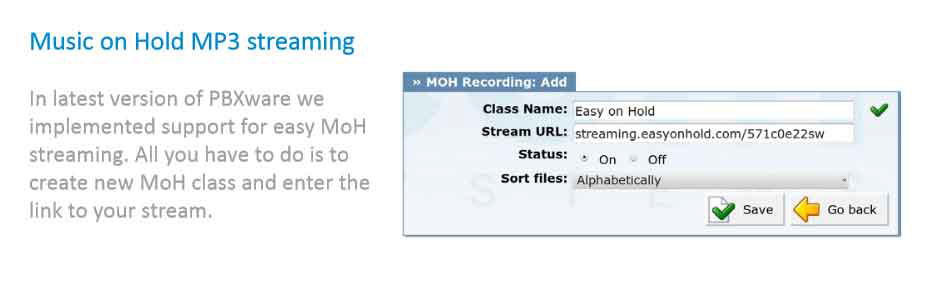
Bicom Systems PBXware supports URL-based music on hold through its own administration interface. Add a new MOH class, paste the stream URL supplied by Easy On Hold®, turn the class on and assign it to the appropriate destinations. No external audio player or recurring file upload is required.
Business and marketing teams manage licensed music, professionally produced messages and emergency announcements remotely through the Easy On Hold Content Control Center™. Changes can be heard on the live stream quickly or scheduled with precise start and stop dates.
The solution scales from one shared stream to multiple streams for distinct caller profiles. Sales, support, regional offices and other groups can share a consistent experience or receive uniquely scheduled content. High-availability infrastructure and failover streams help keep caller audio available.
How to Add an Easy On Hold Stream to Bicom PBXware
Provision Your Stream
Easy On Hold creates your licensed, managed audio stream and provides the primary and failover URLs for your Bicom deployment. Create additional streams when separate caller groups need different content.
Open Music on Hold
Sign in to PBXware administration and navigate to Home > Tenant > System > Music on Hold. Open the Classes section and select Add MOH Class.
Enter the Stream URL
Name the MOH class, paste the Easy On Hold URL into Stream URL, set Status to ON and save. Use the secure URL exactly as supplied.
Assign and Test the MOH Class
Assign the class to the applicable extensions, queues, ring groups or other destinations supported by your PBXware configuration. Place test calls through each real caller path and confirm audio level, continuity and the intended stream assignment.
Bicom Systems Streaming Music On Hold FAQs
Common questions about direct Easy On Hold streaming in Bicom PBXware.
Yes. PBXware accepts a URL in the Stream URL field of a Music on Hold class. The PBX connects directly to the Easy On Hold stream, so no analog audio player is required.
Yes. Provision multiple Easy On Hold streams and create corresponding MOH classes when sales, support, locations, regions or other caller groups need unique music and messages.
No. Once the stream URL is saved and assigned, authorized users update or schedule content in the Easy On Hold Content Control Center. PBXware continues using the same URL.
Yes. Authorized users can activate an emergency message for the applicable stream and set an automatic stop date, helping prevent temporary announcements from remaining active longer than intended.
Confirm outbound access to the supplied stream URLs, test the primary and failover paths, verify each destination uses the intended MOH class and listen through actual holds, transfers, queues and ring groups.
Get Info & Request a Demo
Tell us a little about your business and we’ll show you how Easy On Hold can elevate your customer experience.