
Easy On Hold® for the 8x8 Phone System
Deploy professional music on hold and custom messages for callers using your 8x8 phone system.

8x8 Music On Hold Setup, Audio Files and Resources
Easy On Hold® helps you connect with callers using professionally produced music and messages designed for your 8x8 phone system.
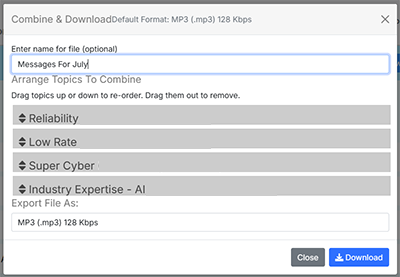
In 8x8 Work, hold music starts at the beginning of the selected file each time a caller is placed on hold; it does not run continuously. Use the Combine & Download feature in the Easy On Hold® Content Control Center™ to arrange several messages into one finished audio file and refresh it as your communication needs change.
8x8 Work administrators can upload or record audio, manage it in the audio files library and assign music on hold to individual users. Music-on-hold assignments can also be changed for multiple users with Bulk Edit.
8x8 Music On Hold Implementation Options
Create or Upload an Audio File
In 8x8 Admin Console, go to Home > Users, edit the appropriate user profile and locate Music-on-hold. Select Change, then choose an existing file or use + Create Audio Files to upload or record new audio.
Use a Supported 8x8 Work File
The 8x8 Work audio library accepts AU, WAV, VOX and MP3 files that are 10 MB or smaller. Give each upload a clear name and note so administrators can identify and manage it later.
Assign and Update Hold Music
Select the desired file and save the user profile. Administrators can use Bulk Edit to change music-on-hold assignments for multiple users. Because playback begins at the start of the file, lead with the most important message and test the complete caller experience.
Account for 8x8 Contact Center
8x8 Contact Center uses a separate audio workflow in Configuration Manager. Custom Contact Center files are uploaded from Home > Audio Files and should be 8 kHz, 16-bit, monaural WAV. Play and verify the uploaded file before referencing it in an IVR script.
Get Info & Request a Demo
Tell us a little about your business and we’ll show you how Easy On Hold can elevate your customer experience.