Music On Hold by Easy On Hold

  • Subscribe to the RSS Feed
  • Add to your Favorites
  • Panasonic 2-Line, 4-Line Phones And Support

    Posted on December 1st, 2011 in How To Tips, On Hold Equipment Reviews | Comments Off

    For small offices using ordinary phone lines, Panasonic makes a few business-friendly phone models of note. Setting up these phones can be tricky when you’re dealing with multiple lines and handsets, voice mail, auto attendant, etc.  This post will point out some features that you’ll find, and point you toward support options.

    KX-TG9391T

    Panasonic KX-TG9391T Phone - Can be used with music on hold adapter.

    Attention! Do not use the built-in message on hold offered with some phone models. We’ve heard several complaints about the poor quality and lack of memory. Use only licensed music through a music on hold dealer, such as Easy On Hold.

    The Panasonic KXTG9391T overcomes many of the drawbacks that have been associated with wireless telephones. It is a 2-Line phone with a wired base and wireless handsets. In addition, it can be paired with a music on hold adapter that allows phone hold music activation by pressing the hold button.

    Features:

    • KXTG9392T comes with 2 wireless handsets
    • KXTG9391T comes with 1 wireless handset
    • Accepts 2 incoming lines
    • One year manufacturer’s warranty
    • Includes one corded base and one cordless handset with its own charger cradle
    • Expandable: add up to a total of 6 wireless extensions
    • 30% battery life increase over 5.8ghz models, such as the KXTG4500B
    • 40-minute digital answering system
    • Night mode ringer
    • Program each handset to ring when you want
    • Both the base and speakerphone function as hands-free speakerphones
    • 3-Line Backlit LCD Display
    • Backlit Keypad
    • 3-Way Conferencing
    • Number Caller ID Memory
    • Message Waiting Indicator
    • Adjustable Ringer / Volume Control
    • Handset to Base / Handset Intercom
    • Call Transfer
    • Handset Locator / Paging
    • Date / Time Display
    • Clock & Alarm
    • Hold button – only activates hold music when paired with Skutch Electronics CK1P-6 Adapter

    If you need 4 Lines, the Panasonic KX TG4500B makes strides toward PBX-style features in an ordinary phone system. (Video) There can be a time-consuming set up for

    Panasonic KX TD824

    Panasonic KX TD824 is a hybrid system. It mimics features found in PBX phone systems at a lower cost.

    any of these smarter, programmable phone systems.

    The alternative is to move up to a Hybrid phone system, such as the KX TD 824. (Brochure) The Hybrid system does not require a music on hold adapter. Most of the benefits of a PBX style phone system can be achieved with a hybrid system, usually at $600 to $1500 (depending on number of lines, extensions, used or new, etc.).

    Getting Help

    While Panasonic does have a complete support site with live chat and documents, multi-line phone support is only achieved via telephone. Panasonic Multi Line Telephone Unit support: 9am to 9pm weekdays: 800-211-7262.

    Using a good-quality office phone is important, when you consider that a majority of business dealings involve phone calls. AT&T reports that only 3 out of every 10 calls get through without on-hold time, so having a plan for what callers on hold will hear while waiting is essential. Most small office phones, including the Panasonic KXTG9391T, KXTG9392T, and KXTG4500B do not have the capability to play music or messages on hold. With Easy On Hold working with you, however, a professional on hold music and message can be added using an adapter made for your specific phone device.

    Share

    iPod Not The Best Choice For Music On Hold

    Posted on October 13th, 2011 in On Hold Equipment Reviews | Comments Off

    A caller to Easy On Hold asked for some tips on plugging in his iPod to play music on hold on his phone system. It can be done, but that’s not to say it is a good idea.Portable mp3 players are great for personal listening, but these music machines are not built for 24/7 music on hold playback. Here are a few reasons why we recommend against using your iPod for on hold music playback.

    Continuous use of your iPod may void the warranty.
    Since the warranty explicitly states that the product is not made to be used continuously (“uninterrupted”), any damage from such use is not warranted.The following is directly from the Apple Warranty on iPod products:

    Apple does not warrant that the operation of the product will be uninterrupted or error-free. Apple is not responsible for damage arising from failure to follow instructions relating to the product’s use. This warranty does not apply: (a) to damage caused by use with non-Apple products; (b) to damage caused by accident, abuse, misuse, flood, fire, earthquake or other external causes; (c) to damage caused by operating the product outside the permitted or intended uses described by Apple; workmanship; or (g) if any Apple serial number has been removed or defaced.

    Low-level output may be inadequate.
    Because the iPod is built to conserve battery power, the audio output is configured for use with high-efficiency headphones. This low-power output is not made to match the impedance of a telephone system.

    The iPod will need to be reset if it loses power.
    An iPod will not restart in the case of power loss; someone will need to remember to restart the iPod.

    An iPod makes a tempting target.
    The popularity and universal usability of the iPod makes it a frequent target for theft. Due to the small size, someone could easily walk off with it.

    Lithium batteries are not meant for 24/7 charge cycles.
    The battery life of an iPod varies by model and allows for a limited number of battery charges (“cycles”) before the battery needs to be replaced by an Apple store or representative. A USB Power Adapter can be purchased from Apple for an additional charge, however this type of audio player is not intended for use in a 24 hour, 7 day rotation.

    From the Apple Support Website
    Charging your iPod, iPod Nano or iPod shuffle while in certain carrying cases may generate excess heat, which can affect battery capacity. If you notice your iPod gets hot when you charge it, take it out of its case first.

    From The Seattle Times
    March, 2008 — Japan is investigating a possible defect in Apple’s iPod after one of the popular digital-music players reportedly shot out sparks while recharging, a government official said Wednesday. An official at the trade and economy ministry, which oversees product problems, said a defect is suspected in the lithium-ion battery in the iPod Nano. See article.

    From Fortune Magazine
    March 2008—After researching Japan’s investigation of an iPod Nano that caught fire, Fortune Magazine found the following entry on an apple comment board: “Is there something wrong with the battery they put on the first gen iPod Nano? Mine just got blown to pieces. I was just charging it on my Laptop then it suddenly sparks and it caught fire. Even the clicking wheel got melted and the back of the iPod split open.”  See article.

    From WSBT-TV
    Lock, stock and two smoking iPods! Atlanta man burning mad! “I’m still kind of freaked out that after only a year and a half my iPod caught fire in my pocket,” said Williams. The iPod uses a lithium ion battery — the same type of battery under recall for setting laptops on fire. See report.

    From PC World
    It’s now against federal regulations for passengers on U.S. flights to pack spare lithium batteries. The new regulations are intended to reduce the risk of aircraft fires.

    Share

    Why Does Some Music On Hold Sound Less Than Perfect?

    Posted on September 21st, 2011 in How To Tips | Comments Off

    Share

    When your custom music and message on hold is produced by Easy On Hold, the highest recording studio standards are upheld. Files are 100% digital and of the highest quality sound. Our voice studio uses industry-standard equipment and practices. When you receive your digital audio, it sounds clear. Perfect. So why doesn’t it sound as good when you hear it on your phone system?

    Listening On A Telephone Device Limits Sound Frequencies
    Telephones are unable to transmit high-quality audio. Frequency response is a term that refers to a range of sound, typically measured in Hertz, a measurement of cycles per second. The smaller the number, the lower the frequency. The human ear is said to be able to hear between 20 and 20,000 Hertz. (more information). Now take a look at various communications systems and notice that the smallest frequency range (or poorest sound) is represented by the telephone.

    System Frequency Response
    Public Switched Telephone Network 300Hz to 3kHz
    AM Radio 100Hz to 5kHz
    FM Radio 50Hz to 15kHz
    Consumer stereo system 20Hz to 20kHz
    Professional audio equipment 5Hz to 24kHz

    (Chart courtesy of  diracdelta.co.uk.)

    Your Phone System Has Its Own Limits On Sound
    Understanding why your particular phone system does not produce better sound would require a discussion of bit rate, throughput, bandwidth, compression, encoding and the like. The summation of these variables is the reason your phone system sounds the way it does. Phone systems use various methods to squeeze sound into small spaces. The result can be disappointing and unpredictable. Yet, we’re all used to it. We all know that the tiny little speaker on the telephone handset is going to sound “tinny” to some extent.

    External Player Settings
    If your phone system uses an external player as the music on hold source, that music on hold device may be putting too much audio into the phone system (overdriving), causing the sound to be distorted. The overall volume may not change because the phone system is compensating for the audio level, attempting to maintain a sound limit. Try backing off the volume of the playback device. Most phone systems require a 600-Ohm input from an external device.

    File Format May Be Incorrect
    If your phone system uses an audio file upload as the music on hold source, the correct file format must be used. These files are highly compressed, as the phone system is designed to conserve memory. The file compression further reduces sound quality in many cases. This is another reason why an external device is the best choice, if possible, for music and messaging on hold.

    VOIP System May Be Converting Files
    Once an audio file is uploaded to a VOIP Off-Site (hosted) phone system, the host may process or compress the audio file further, possibly converting it to a different format. This process can vary between phone system providers. Again, this is out of your control. Some VOIP systems do not allow a volume control for audio playback, so it may be best to send the audio file to your phone system host and request that they make the music sound as pleasant as possible.

    Listening On A Cell Phone
    Cell phones employ noise-cancelling technology, which can cause sound distortion. By emphasizing voice frequencies, a cell transmission can help your call recipient find your voice among the background and wind noise. The result when listening to music, however, is that a warble or distortion occurs. When testing your music on hold, use a land-line phone for the most accurate results.

    How To Load USB Music On Hold Player

    Posted on March 24th, 2011 in How To Tips | Comments Off

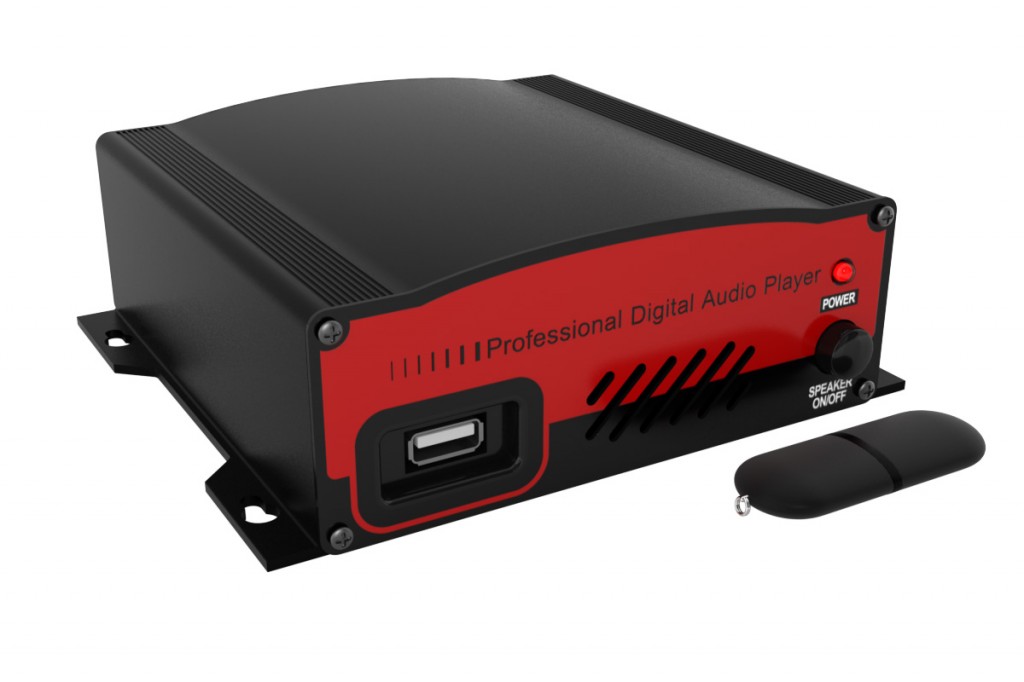
    USB Pro Music On Hold Message Player

    USB Pro offered by Easy on Hold

    If you’ve got a music on hold message player that is using a USB drive as the audio source, you’re probably in pretty good shape for music and message on hold audio. These USB machines allow you to play a file that ends in the extension .mp3 simply by loading the mp3 on the drive.

    Naturally, you won’t want to have the same audio (music on hold announcements) playing month after month, so it’s a good idea to know how to change the audio messages on your USB message on hold player. Here is a simple “how to” to help get your audio changed and updated.

    Know Where Your New Audio Is
    If you have downloaded your message on hold .mp3 from your Easy On Hold Account, be sure to save it to a location on you pc where you can find it. Typically the folder Music or your desktop will work best.

    Access USB Drive
    Remove the USB drive from your music on hold player. If you are using the USB-PRO offered by Easy On Hold, you will notice that even with the USB drive removed, your callers will continue to hear music and messaging. Insert your USB drive into an active USB port on your computer. If using “Auto Play”, a window should pop up showing you various options (“what would you like to do?” ).  Choose open folder to view files. You are now looking at the inside of the USB drive. This is where you will place the new files. You may choose to remove the contents of the drive or move the contents to your pc.

    Learn how to troubleshoot a USB flash drive at eHow.

    Move .mp3 File To The Drive
    Select the .mp3 you want to add to your drive (remember, you saved it to a place where you can easily find it?) and right click (Mac users: to accomplish right-click on a basic Mac mouse, use: control + click). From the right-click menu, select copy. Now go back to the USB drive folder and paste the .mp3 file into the folder. This can be done by right clicking and choosing paste.

    Alternate Method
    You may find the contents of the USB drive by clicking Computer and looking for Removable Drive. The USB flash drive provided by Easy On Hold is named MOH Drive.

    Safely Remove The USB Drive From Your PC
    Go to the bottom right of your screen and move your mouse over the icons to find the one that says “safely remove hardware”. Right click the icon and select “safely remove hardware” to be sure you do not cause any damage to your drive when unplugging it. When the screen pops up double click on “safely remove hardware” and click OK on the next pop up screen.

    Return The USB Drive To You Hold Music Message Player
    Remove the USB drive and place it in your music on hold message player. The message player will play all of the files on the drive in alphanumeric order, then repeat all. If only one .mp3 file is on the drive, only that file will play repeatedly. The music on hold message player stays on 24/7 with continuous audio.

    What Your VOIP Phone System Salesperson May Not Tell You

    Posted on March 7th, 2011 in VOIP | Comments Off

    Be sure to discuss music on hold with your new VOIP phone system provider. You may be disappointed in what they aren’t telling you. Here’s a short story about a business that just switched to a “cloud” phone system (hosted PBX or hosted I.P.) and the problem that the new system poses with music on hold.

    I just got off the phone with Dr. Simms, a cosmetic dentist and Easy On Hold client.  Prior to switching phone providers, Dr. Simms enjoyed knowing that while his patients endured on-hold time, they were treated to professional-sounding  greetings and announcements on a variety of relevant topics. Since the 4-minute on hold message production would rotate 24/7, Dr. Simms was sure that his patients would hear a different snippet of information every time they called and were placed on hold (ever so briefly).

    Today Dr. Simms has traded his old phones for one of those snappy new “VOIP” systems, in this case a “cloud” or “hosted” system provided by Fonality. The doctor called Easy On Hold to find out how to plug in his on hold message player to his new phones, so that he could continue to utilize the hold music feature. We looked into Fonality for him. The Fonality website says, “ Music On Hold (MOH) is as simple as uploading MP3 files using the web-based administration panel. Use MOH creatively to highlight promotions for new customers, up sell current customers, or calm angry customers calling your support team.” Somehow, Dr. Simms was not informed that he would need to manually upload files, or what the format was. “That’s OK,” we told him, we can get you an .mp3 file for you to load–you just need to know how to log in and load the file to the system.

    Then we asked, “Are you aware of whether the hold message file will play from the beginning each and every time the hold button is pressed, or whether the file will play in rotation as before?” No, the doctor did not know. We placed a call to Fonality to find out.

    The “talk to an expert” line was picked up by the Fonality voice automation, which announced at the end of the menu that calls that are technical in nature must be placed to a different number. After giving the number, the automation said, “To hear this message again, press pound.” Having missed a few digits, I hit pound. “That is not a valid option, ” announced the voice automation. “Hmmm. I guess I’ll press one then.”

    Pressing one gets you to a salesperson. Surely a sales expert will be able to answer my question. I stated who I was and why I was calling and asked whether the Fonality on hold message plays from the beginning each time the hold button is pressed. “That’s a technical question,” I was told. “Actually, no one has ever asked that before. I have no idea.”

    To his credit, the salesperson was kind and spoke clearly.  The gentleman offered to take my number and have a technician call me back. Sounds like a plan. Still, I can’t help wonder how or why the music on hold function is not discussed more completely between salespersons and their clients.

    Yes, we will find out how the music on hold works at Fonality. Yes, we can help anyone with the proper audio file formats for VOIP hosted phone systems. No, we really don’t get why these providers leave their customers so uninformed. I’m hoping we can put something together with some leading VOIP hosted PBX providers so we can provide better service and more flexible and professional solutions.

    Share

    Mini Tutorial: Music On Hold Installation For Nortel Phone System

    Posted on December 20th, 2010 in How To Tips | Comments Off

    A frequent question regarding on hold system setup is, “How do I install the music on hold messages on my Nortel (Norstar) phone system?”. Here is  a quick tutorial.

    1) Connection from USB PRO Music On Hold Player

    The connection required for the music on hold player is “rca” type (also called phono). The USB PRO has two outputs: 8-Ohms and 600-Ohms. The 600-Ohms audio output is best suited for telephone systems, however, the 8-Ohm output is available to provide a higher-volume output if needed.

    2. Connection to Nortel Phone System.
    Nortel systems usually require the music on hold connection to be punched down onto the cross-connect block (a.k.a. punchdown block, terminating block).

    Telephone System Punchdown Block

    Telephone System Punchdown Block

    Your telephone system administrator should know how to punch down onto the block. A female RCA-type (phono) jack should be provided to allow use of the rca connection cable that came with the purchase of your USB PRO music on hold player.

    WORKING WITH AN EXISTING CABLE
    Sometimes you must work with a punchdown block that already has a connector wired to it. Often this connector is not RCA type. Typically, it is a 3.5mm (one-eighth-inch) male audio plug (the size used by personal headphones or earbuds). In this case, the plug must be adapted to fit in the rca audio output fitting on the USB PRO music on hold player.

    3.5mm male audio jack

    3.5 mm male audio jack

    Adapting from 3.5mm to RCA
    A simple audio adapter can be used to modify the tip of the 3.5mm plug to convert it to RCA. Radio Shack adapter 274-871 will do the job. Just plug the 3.5mm jack into the back of the 274-871 adapter and you’ll be able to plug into the USB PRO output to complete the connection to your phone system.


    NORTEL SYSTEM CONFIGURATION
    If after making a secure audio connection you still do not hear music on hold playing, you may need to set the configuration of the Nortel phone system to activate music on hold. Here is the sequence for most Nortel Systems:

    1) FEATURE * * CONFIG (266344).  You will see Password: displayed

    2) CONFIG (266344) is the default password. You will see A. Configuration

    3) Hit forward arrow to enter menu A. Configuration. You will see 1. Trk/Line Data

    4) Scroll to 3Call Handling and then enter this menu.

    5) Hit forward arrow ten times (scroll to On hold: ) You will see On hold is set to either Silence, Tones or Music

    6) If this is not set to Music, hit CHANGE until Music appears.

    7) End session by hitting Rls (release) or disconnect.

    Your phone may function differently, but this instruction demonstrates a common procedure for activating music on hold on a Nortel System.

    Share