6 Reasons Why Companies Want Music On Hold Messages

Every day, professional, well-established companies (many of them brand names you know) call on Easy On Hold to create custom music on hold messages. It’s interesting to learn why these firms have finally decided to take advantage of time callers spend on hold. There are five major motivators. Here they are.

1. My competitor has on-hold messages, so I have to have something similar.
In competitive analysis, a company attempts to uncover the methods and means behind a successful marketing plan. “What worked for them might also work for us,” is the thought. When you compare your competitor’s on-hold experience to yours, it doesn’t take long to tell the difference.

2. My boss heard our on hold and hates it.
Somewhere, at some time, someone heard the silence or fuzzy radio or simply awful music on hold and declared, “We can do better than this!” And that person was in a position to do something about it. Often this means appointing a team member (marketing, I.T. or office admin) the task of obtaining a music message on hold solution.

3. We want to move products and services through on hold messaging.
As the definition of marketing begins to broaden in the information age, every opportunity is considered. Where can we find our target market? There’s definitely a vibrant marketing channel available through your phone’s hold button. There, callers who are already interested in your products and services are waiting to hear what you can do for them.

4. We’re taking a careful look at our entire image.
It’s an image thing. How is our business perceived? How do we shape those perceptions? How do we build the brand?  A good deal of investment is made into creating, managing and protection your brand. A small investment in a message on hold program will go a long way toward maintaining that good image.

5. Frustrating callers and losing business.
Silence causes people to think they’ve been hung up on, or have lost the cell phone signal. Radio can deliver noise, unpleasant talk and worst of all–advertising (even for your competitors). These frustrations cause a higher rate of call abandonment. Today’s callers quickly go elsewhere when they don’t get what they’re looking for right away. Companies that think they may be losing sales to call abandonment are probably doing so. They need a professional on hold solution.

6. We’ve got a new phone system.
Business telephone technology is getting better and cheaper, allowing small companies to handle calls with “big company” style. As part of upgrading the phone system, companies are looking for good quality voices to use in the ACD/IVR (automated attendant) queues and while callers are waiting on hold. Firms are well-advised to check on the new phone system’s on hold message capabilities. A custom message on hold program can also include the voice mail and attendant messages you’ll also need with that new phone system.

Share

Troubleshooting Guide For USB Type Music On Hold Message Player Device

USB-Pro MUSIC ON HOLD TROUBLESHOOTING GUIDE
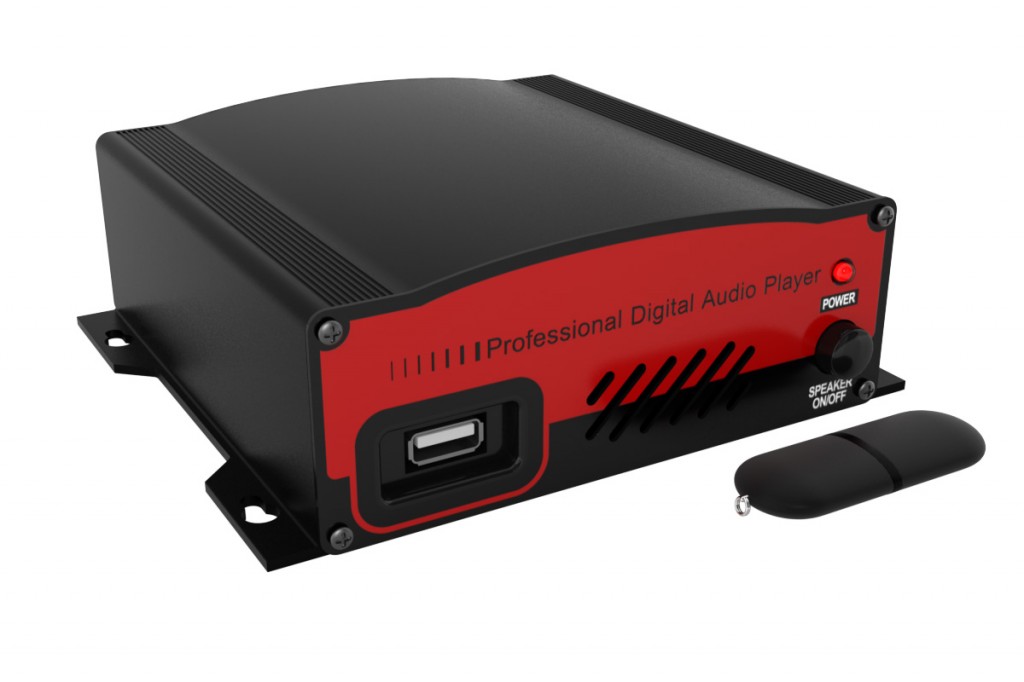
The USB-Pro, like other .mp3 music on hold message player devices, delivers a constant stream of sound for phone systems that allow introduction of on-hold audio by an external on hold device. This guide will help troubleshoot for lack of audio and poor sound quality. You may download this guide as a pdf (click here to download usb message on hold player troubleshooting guide).

USB-Pro mp3 Music On Hold Player

USB-Pro mp3 Music On Hold Player

Problem: No Audio On Hold

  • CHECK SPEAKER FOR SOUND: Some on hold audio players come with a speaker button. Is the unit putting out sound?
  • CHECK VOLUME: Is volume control off or too low?
  • CHECK AUDIO OUTPUT FOR SOUND: Adapt a headphone (ear bud) to RCA jack using adapter (Radio Shack RCA 274-871) and check output from 600-Ohm and 8-Ohm audio outputs on back of unit.
  • CHECK MEDIA: The USB-Pro comes with an “internal” message on hold track. When the USB media (usb drive, thumb drive) is removed from the unit, the internal audio plays. Test by removing media or replacing media drive. Check drive content on a personal computer.

Problem: Audio Is Poor Quality

  • CHECK VOLUME: If the audio seems to get faint or fade in and out, try more volume. Some phone systems have an anti-noise filter that will try to turn off the hold music unless a certain volume threshold is reached. More volume will indicate to the phone system that intentional audio is present.
  • CHECK CONNECTIONS: If the audio is intermittent, check the connections at the player and the MOH input to be certain they are secure.
  • CHECK WIRING: All wiring must be insulated. Old audio cables may need to be replaced. Message on hold players purchased from Easy On Hold include one RCA-to-RCA cable and one RCA-to-3.5mm adapter plug for use with 3.5mm telephone system MOH input receptacles.
  • TEST USING LAND-LINE PHONE: Cell phone signals often distort or warp music on hold. Call in using a land-line for the clearest test signal.

More Tips:

  • Callers hear the music on hold message in progress, not from the start. The player repeats the audio production over and over.
  • There is no need to turn the music on hold player off. It is designed to play 24/7.

Watch Video Showing USB-Pro Music On Hold Player

Share

Add Music On Hold to Comdial DX-120 PBX Phone System


The Comdial DX-120 is a commonly-found PBX business phone system. Adding music on hold to this system is not too tricky. Take a look at these instructions, provided by Comdial in their DX-120 Phone System Manual.

A Comdial DX-120 in use at an Easy On Hold customer site.

Pictured: A Comdial DX-120 in use at an Easy On Hold customer site.

INSTALLING EXTERNAL MUSIC ON HOLD SOURCE

1) Be sure that the entire system is turned off.

2) Remove the KSU 1 cover (four screws at each corner).

3) Install a static discharge wrist strap on your bare wrist, and adjust it for a snug fit.


CAUTION

Be sure that the strap is touching bare skin and is not isolated by clothing.

4) Connect the wrist strap cord between the wrist strap and an AC or earth ground.

5) Connect a static discharge wrist strap to a suitable earth ground.


CAUTION

Circuit boards are susceptible to damage caused by electrostatic discharge. You must

keep this in mind as you handle the circuit boards. For additional information, see Vertical

publication IMI01-005, Handling of Electrostatically Sensitive Components.

6) Locate the CPM and the “MUSIC” option strap.

7) Make sure that the “MUSIC” option strap is in the “EXT” position. (Required for external source to operate on MC1.)

8) Locate CPM the “MC1” connector jack on the CPM.

9) Connect the output of the external music on hold source to the appropriate MC1 connector.


HINT

At default MC1 is used for Music On Hold.(This means plug the message on hold player into the MC1 input)

The connection is a 3.5mm jack (also known as one-eighth-inch). You will use the RCA-to-3.5mm plug adapter included with your music on hold device from Easy On Hold.

10) Adjust the music volume level at the external music source (music on hold player).

HINT

When adjusting the music for Music On Hold:

Place a call into the system on one of the CO Lines so that the external music source is heard by the calling party (you). Note: use a land-line to make this call, as cell phones are susceptible to noise, drop in audio quality and distortion as a result of noise-cancelling processing.

Adjust the volume level of the external music source until a desirable level is reached.

Give us a call.

Don’t worry about asking for help. We can be reached between 8:30am and 5pm Eastern time: 1-888-798-HOLD (4653).

AT&T 4-Line Phone Integrates External Music On Hold Message Device

An Easy On Hold client saw this article and purchased this phone. Here is what she said:

“After speaking with your team, I went to Radio Shack and purchased the 3.5mm to RCA plug adapter (RS 274-387) which allowed me to use the cable that came with the phone system. I connected the Easy On Hold USB Pro message player directly into the phone and it works perfectly.”

Original article:

AT&T now offers a 4-line phone that provides an input for an external music on hold player. It is the SB67138, also called the Syn-J.

Most ordinary 2 to 4 line telephones do not provide an input for music on hold. Small businesses can accommodate a music on hold player using an adapter (see Skutch Electronics Adapters). This has added up to $300 cost to the on hold playback setup. While the Syn-J is more expensive than most cordless phones, it does the job of a fairly sophisticated phone system at a very reasonable price. The suggested retail price is $379 for the phone base station and one handset, although we’ve seen it from $379 to $505 on the web. Up to 10 handsets are supported at about $100 each.
AT&T website Syn-J page

SB67138 Syn-J music on hold setup

How The Music On Hold Port Works
In reviewing the user manual, we discovered that an audio source, such as a music on hold player, can be connected to the HEADSET/AUX INPUT jack on the side of the phone. This means continuous audio can be played into the telephone, so that when the hold button is depressed, the caller hears the audio stream. This also means that you may not use this port for a headset, as it is an “either-or” option. Once you have decided to use the HEADSET/AUX INPUT jack for streaming music on hold, you must program this option into the phone. There is a somewhat involved programming exercise required to set your preferences on this phone (but once you realize all it can do, you may see that it’s worth the effort).

Repeater Technology
If your small business has a warehouse, nursery, plant, yard, etc. and you need a way to stay in touch with the staff at several remote locations, this is the phone for you. Optional range extenders (repeaters) can be placed at a distance from the base station, to double the range for wireless handsets. Phones on your site, but farther away from the main office can now communicate on the same system.

AT&T SB67138 Syn-J

Features
Push-to-talk is also integrated into the Syn-J system. The handsets can become intercoms (radios/walkie-talkies) for quick communication needs with your team. An on-board battery provides 20 minutes of system use in the event of a power failure. Phone calls can be recorded using buttons on the base station. A built-in auto-attendant/voicemail system can also be set up to handle calls when you can’t. 3-way conferencing is also possible.

Manual Missing Key Information
The manual for the AT&T SB67138 mentions using a laptop as an on hold source (which seems unprofessional) and does not include warnings against the use of unlicensed content for phone on hold. They should make it clear that it is not lawful to re-broadcast copyrighted or unlicensed music (including radio stations–yes, even classical music) on hold. For best results from unavoidable hold time, use a professional music on hold message provider.

 Installation

USB Pro Hold Music Player
Recommended Music On Hold Message Audio Source (Device)
The simplification of introducing a hold music player, such as the USB-Pro, makes the AT&T SB67138 an affordable alternative for small businesses seeking a professional phone and music-message on hold solution.
Share

Music On Hold For Marketers Who Want Better Results

Music On Hold Provider Offers Internet-Load “Smart Player” For Savvy Marketers Who Want Better Results

June 6, 2012—The music on hold industry and Easy On Hold is making leaps and bounds with the latest in on hold technology– “smart players” that automatically provide content downloads right into the phone system, with the ability to provide automatic stop and start dates, even day parting for targeting content on specific days and/or times. ‘It’s a new day for music on hold,” says Julie Cook, president of Easy On Hold, a U.S.-based music on hold provider.

“This technology changes everything about our industry’s ability to compete as a relevant marketing tool,” says Cook. “Until now, it’s been difficult to market to callers on hold with any date specificity. Advertisers try to keep up with promotions or holiday or seasonal pushes, and it’s a lot of work to remember to pull it after the fact, so you end up with old content. It’s embarrassing and hurts your brand image. Advertisers have given up, choosing generic content instead,” she continues. “We knew we could do better.”

“With a smart player, you can start a promotion on July 1 and know it will end correctly on July 15, for example, because of the automatic start and stop programming. Or, callers can hear about a promotion on Monday that you don’t want them to hear on Wednesday, or a morning announcement that won’t be heard in the afternoon. It’s that specific. It opens up new opportunities for advertisers that they didn’t have before,” Cook says.

The players are loaded onto the client’s network and also into the phone system, but pose no IT risk because they’re not streaming the audio. “They pull in the audio once or twice a day, and then the door closes again,” Cook explains. “There is no way this system can ‘bring down’ your network. The players are smart, but they’re not that smart.”

One new development is in the area of VOIP technology, or phones that use the internet to deliver service. Currently, there’s no way to introduce an external player into most VOIP phones. “The better VOIP developers understand that music and messaging on hold is a vital element to their client’s marketing program, and they’re working with us to develop the ability to introduce an external player, like a smart player, into the mix. Otherwise, clients have to upload files into their phone systems. They don’t get the scheduling capabilities offered by the smart players, and even worse, the files play from the beginning each time,” Cook says.

Cook explains that in addition to internet-load technology, Easy On Hold provides traditional USB-based players as well as supporting clients with legacy CD and cassette players.

For more information, contact Julie Cook at Easy On Hold, 888-798-4653 x 22 or Julie@easyonhold.com.

Share

How To Connect A Music On Hold Message Player

Is music on hold installation a do-it-yourself project? It might be as easy as plugging in an audio cable. Here’s what you need to know.

THIS REPORT APPLIES TO: Connecting a professional music on hold player to an MOH input on a PBX or KEY style phone system. IT DOES NOT APPLY TO: Off-site or hosted PBX systems, non-PBX or KSU-less phone systems (i.e., ordinary office phones purchased at electronics or office supply store).

AUDIO TRAVELS FROM MUSIC ON HOLD PLAYER INTO PHONE SYSTEM
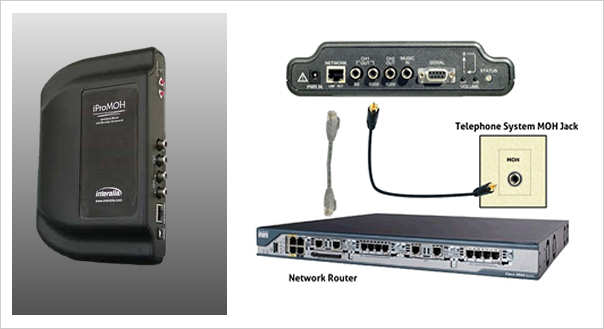
First, let’s take a look at the “big picture”. Audio is played continuously from the music on hold player. The sound travels from the AUDIO OUTPUT over the audio CABLE to the MOH INPUT on your phone system.

8 OHMS OR 600 OHMS? WHY TWO OUTPUTS? On the back of your music on hold player are two connections labeled AUDIO OUT. The 600-Ohm output is intended for telephone systems. (If your particular situation needs a louder signal, you may use the 8-Ohm output without harming your equipment.)

The 8-ohm output is appropriate for sound amplification systems, such as public address systems used by museums and amusement parks.

RCA CONNECTOR
Introduced by the Radio Corporation of America (RCA) this plug is also known as cinch/av or phono (a term meaning phonograph, but too easily confused with phone, as in telephone). All professional music on hold players sold by Easy On Hold use an RCA connection for the audio output.


REPLACING RADIO OR CD PLAYER

If you are replacing an in-use audio source such as a radio or CD player with


your new professional music on hold player, remove the connection from the player and adapt the plug to RCA.
Adapters are inexpensive and easily found at electronic stores, or by calling Easy On Hold at 1-888-798-HOLD (4653). Shown: RadioShack 274-871.

NO PLUG AT ALL?

Perhaps your telephone technician connected wires for music on hold directly into your telephone system. Try connecting an RCA plug on the end for the music source.
A “punch-down block” is a device for attaching wires to phone systems. Your telephone technician may need to attach the on hold playback device there. A telephone technician using the proper tools will be required if changes to the punch-down block or any other part of your phone system are needed. Do not tamper with your phone system’s punch-down block.

TIPS & TRICKS

  • Never force a 3.5mm (mini-plug) into an RCA receptacle. Once the inside of the receptacle is bent, the correct plug will no longer make the connection.Never plug an audio cable into a power receptacle. To be sure, plug in the AC power adapter first and see that there is power to the unit.
  • Some on hold audio players come with a speaker button. Is the unit putting out sound? If so, turn the volume to 50% and call in. Once on-hold you can adjust the volume.
  • If the audio seems to get faint or fade in and out, try more volume. Some phone systems have an anti-noise filter that will try to turn off the hold music unless a certain volume threshold is reached.
  • If the audio is intermittent, check the connections at the player and the MOH input to be certain they are secure.
  • All wiring must be insulated. Old audio cables may need to be replaced. Message on hold players purchased from Easy On Hold include one RCA-to-RCA cable and one RCA-to-3.5mm adapter plug for use with 3.5mm telephone system MOH input receptacles.
  • Cell phone signals often distort or warp music on hold. Call in using a land-line for the clearest test signal.
  • Callers hear the music on hold message in progress, not from the start. The player repeats the audio production over and over.
  • There is no need to turn the music on hold player off. It is designed to play 24/7.
  • A support ticket can be submitted online at www.easyonhold.com/support.

Get the full report: Connecting_Music_On_Hold_Message_Player_Equipment-Easy_On_Hold_Whitepaper.pdf


Share