Tag: Music System
Can Your Message On Hold Company Be Green? 10 Ways We Are.
A recent blog post at AutoMPG.org gets it right when they say:
Message on hold is one of the most cost effective methods of communicating a company’s marketing message to its customers and prospective customers, and it works. But messages on hold can also be one of the most environmentally friendly forms of advertising there is.
Here’s how Easy On Hold is helping:
1) We offer message and music on hold players that are managed over the Internet. See information about the iProMOH by Interalia on our site. If you’re managing multiple locations, this type of unit will save you from driving from location to location to maintain and update. Messages are transmitted from the Easy On Hold studio directly to the unit.
2) Internet delivery of music on hold messages means removable media need not be shipped.
3) Cassettes and CDs are disposable.We can keep these from landfills.
4) Cassette and CD packaging can be eliminated, saving paper and plastic.
5) CDs are petroleum-based products. Eco Facts – It takes an estimated 300 cubic feet of natural gas, two cups of crude oil and 24 gallons of water to make a pound of plastic, which is enough for 30 CDs. Further, it’s estimated that it will take over 1 million years for a CD to completely decompose in a landfill. [Source - Back Thru The Future, a New Jersey-based company that recycles electronic devices.]
6) Easy On Hold’s music library is updated and delivered electronically. We do not purchase CDs for the reasons described above.
7) Easy On Hold is now paperless. Our new client scripting service is 100% online. Our writers, producers and clients can easily log in and write scripts that can be stored and produced digitally.
8) Our message-on-hold systems do not use batteries. Easy On Hold recommends the use of a professional music on hold player, rather than an “i-pod” type player that utilizes a battery. We definitely discourage the use of all types of batteries. Kate Krebs of the national Recycling Coalition states, “Lithium Ion batteries are classified by the federal government as non-hazardous waste and are safe for disposal in the normal municipal waste stream.” Most other types of batteries include toxic metals such as cadmium. [Source: Computer World] Why use a product that creates waste?
9) AutoMPG.org points out that on hold messaging players may use about 1/50th the energy of a standard light bulb. That’s efficient.
10) Of course, using available “on-hold” time allows you to talk about ways your company is environmentally sensitive–an issue that is increasingly influencing buying decisions. Contact Easy On Hold for help with a custom music message on hold.
The Most Expensive Message On Hold Player
At $575, the sophisticated iProMOH from Interalia, offered at Easy On Hold, is not out to compete with tape, CD, mp3 or flash drive music and message on hold players. It’s in a class all its own.
Curvaceous, yet demure, this on-hold “box” is anything but. It’ll greet callers, “Good morning,” or, “Good afternoon”. It’ll change music styles to more closely fit its audience. It’ll load everything it needs from a standard port-80 Internet connection in about 20 seconds. It’ll never play an out-of-date message.
You don’t need to be an I.T. geek to get the picture: the iProMOH has the right stuff for taking your ho-hum-hold to a new level.
Let’s say you’ve got a restaurant. Before 11am, callers hear about the lunch special. After 1 callers hear about dinner.
At a car dealership, showroom and service hours change from day to day in some cases. At one Easy On Hold customer, Maple Hill Auto Group, callers on Wednesday morning hear, “Thanks for calling us this morning. Our extended hours tonight mean you can shop our showroom until eight pm.”
Music runs on a special schedule, too. Lighter tunes early; more energetic after lunch, for example.
Each announcement is programmed with a specific schedule, including an expiration date. That means no more plugging Christmas specials in January or summer specials in October. When a new message on hold announcement is needed, the Easy On Hold client logs in online and types some verbiage (or requests script writing from the Easy On Hold staff) and the voices are recorded and uploaded to the iProMOH in a hurry.
The iProMOH actually mixes the music and voice tracks “live”, meaning the music rotation and voice rotations are never likely to repeat. The result is a fresh sound for frequent callers.
So, what is it worth to:
- Target your callers
- Sound intelligent
- Play time-sensitive announcements without worry of start and stop dates
- Pre-arrange announcements to come on and off as needed all month, or all year long
- Use a totally hands-free unit that you never have to touch
- Use a unit that reports its current condition and settings nightly to let everyone know that everything’s alright?
$575 may be the best bargain in on-hold messaging.
For purchase plans, including how to use an iProMOH for free or have a demo unit shipped to your I.T. department, check the iProMOH page at Easy On Hold.com.
Message On Hold Adapters For 2-4 Line Phones

The Skutch Adapter is an interface between your phones and your music on hold player.
There’s a way to do it! If you purchased your phones at an office supply store, you’ll have a hard time finding where to plug in the music on hold. These ordinary 2 and 4 line phones are made without the brains to tell music to start and stop when a caller is holding. We can, however, trick the phone into acting like a big office system.
Easy On Hold offers a line of music on hold adapters made by Skutch Electronics. These devices “listen” for the small voltage shift that takes place when the hold button is pressed. This triggers the music on and off at the appropriate times.
Tips For Adding Music On Hold to Your Small Office Phones
- All phones must be the same make and model. Because each phone on the market is different, there is a unique on-hold adapter for each.
- One Skutch device is all you need to activate hold music all of the phones in your office.
- The adapters do not generate music on hold–they activate it.You still need a professional music on hold player.
- While the cost of these on hold adapters can run up to $300, they work with your less-expensive phones, and your office will sound as though you’ve got a big, expensive telecom system.
Easy: Music On Hold Player With Internet Connection
Using an Internet-connected music on hold player is not as complicated as it might sound. Here’s a quick guide.
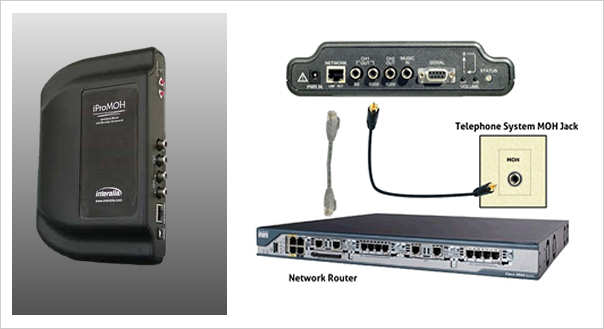
There are several music on hold players in the marketplace today that will connect to a “host server” using a standard Internet connection. The differences between these devices are mainly in the capabilities of the software that controls them. From an installation point of view, an Internet-connected device is very similar to any other hold music player. For our discussion we will be using the Interalia iProMOH device.
Installs with 2 simple connections.
- As with all music on hold players, the audio output (600-Ohms standard, 8-Ohms available) is connected to the MOH input (hold music bus) on the phone system (PBX or KEY systems may have an MOH input or one may be created at the punchdown block). If you are replacing your current music on hold player, simply plug in the new player just as the old one had been.
- The iProMOH connects to the router with a standard Ethernet cable. Many Internet-connected players use Port 80 for an Internet connection, meaning it will use the same traffic port on the firewall as standard Internet traffic. This makes setup much easier, as you may not need to make any firewall settings to get the unit to connect to its home server.
DHCP or Static I.P.
Inform Easy On Hold of your choice of DHCP or static I.P. for each iProMOH. In the case of DHCP, if Port 80 access is available without assigning a unique I.P. to the iProMOH, installation takes just minutes. Once Internet access and power is provided, the iProMOH instantly connects to the Easy On Hold studios.
If your network administrator requires networked devices to use static I.P., Easy On Hold will ship each iProMOH with the proper settings programmed. Required information is:
- Unit I.P.
- Default Gateway
- Network Mask
- DNS Server 1
- DNS Server 2
The iProMOH uses a safe, secure connectivity procedure.
Easy On Hold programs your iProMOH to call out to the host server, then brings in audio to internal memory. Your network is never vulnerable. The iProMOH also supports proxy server.
Why use an Internet-connected music on hold player?
The complex scheduling capabilities of an Internet-connected player, such as the iProMOH by Interalia, means that your office will never play an out-of-date announcement. This allows more targeted messaging and better results.
The iProMOH is also an easier way to make frequent changes to the message without involving office personnel. Changes are programmed into the unit, which then carries out the desired announcement schedule over days, weeks, months, etc.
Finally, multiple locations can be managed by the Easy On Hold studio using the Internet. A reporting feature lets you know if the units are having any problems; you can control volume and message mix remotely.
Audio File Formats For Telephone System On Hold
Better telephone system technology allows message on hold audio to be loaded directly into the phone system, rather than played from an outside source, such as a music on hold player.
If you’re using your phone system’s internal music on hold capabilities, you will need to know the required file format. You message on hold provider should be able to offer the correct format for your phone system.
Here is a list of the most commonly used file formats for telephone system music on hold:
PCM (pulse code modulation) refers to an uncompressed .wav file:
- PCM .wav 44.1 kHz, 16 Bit
- PCM .wav 48 kHz, 16 Bit
- PCM .wav 16 kHz, 8 Bit
- PCM .wav 8 kHz, 8 Bit
U-Law (also known as mu-law) and A-Law are special compression schemes:
- CCIT u-Law (.wav) 8 kHz, 8 Bit
- CCIT a-Law(.wav) 8 kHz, 8 Bit
ADPCM (adaptive pulse code modulation) differs from PCM, in that the PCM .wav files are stored using linear samples, while ADPCM uses deltas between samples.
- IMA ADPCM(.wav) 8 kHz, 4 Bit
Dialogic ADPCM files are always 4 Bit files. Learn more.
- DIALOGIC ADPCM (.vox) 6 kHz
- DIALOGIC ADPCM (.vox) 8 kHz
G711 is a type of U-Law or A-Law. More here.
- G711 u-Law (.vox) 6 kHz
- G711 u-Law (.vox) 8 kHz
- G711 a-Law (.vox) 6 kHz
- G711 a-Law (.vox) 8 kHz
MP3 is extremely common. Excellent results are obtained with a monaural 128 Kbps .mp3 file.
- MPEG-3 (.mp3) 128 Kbps
The .au file extension was begun by Sun Microsystems. It is similar to .wav formats, but requires the .aw file extension.
- .au u-Law 8 kHz, 8 Bit
- .au a-Law 8 kHz, 8 Bit
- .au PCM 8 Bit
- .au PCM 16 Bit
If converting your own files…
If you are converting audio from one file format to another, be aware that it is best to begin with the native file format, that is, the highest-quality original format in which the audio was created. Often this is a 16 Bit .wav file. To work with converting audio files, you might want to try the SwitchSound audio file converter.
Shopping Music On Hold System? 2 More Tips
If you’re looking into getting a music on hold system to help callers endure on-hold time, you’re not alone. Every day I speak with owners of small businesses, technicians, marketers and office personnel who are looking for advice. In our previous post we mentioned 5 Tips.
As promised, here are more considerations that will help you make a smart hold messaging purchase.
Request A Custom Demo. Typically, message on hold providers will play an audio sample of messages on hold they’ve produced for other businesses. That’s fine, but it doesn’t really show you what they’ll do for you. Will you get the same voiceover/announcer, script quality, production quality, etc. as the sample? The only way to know for sure is to discuss your business with a music on hold producer. Let them take a couple of days to write up a short script–about your business. Listen to the voiceover for your actual production. Listen to how the music works with the voice. You don’t need to be completely satisfied, as the script can be modified, the music can be changed, etc., but the demo should tell you if the producer “gets” your business. Also, consider how the production process was handled. Were deadlines met? Did the script speak to the caller, or was it all fluff and corporate-speak? Don’t let the script writer get away with using a boring template.
Is The Music Licensed? I’m assuming you haven’t been staying up at night studying copyright law, and I’m not a lawyer either, but I have learned about the proper way to use music in my business. Please review my report, Understanding Music On Hold Copyright. Since the telephone is a wired communications device regulated by the Federal Communications Commission, any use of music on hold is considered a re-broadcast. Check your telephone equipment manual. Chances are, it includes a warning against use of unlicensed music. Here’s the point: not all music and message on hold providers cover the performance license you need. If the music on hold provider cannot explain how you’re covered, be suspicious. Please visit a page on our site called How To use Music On Hold Legally for more information.
REVIEW:
- Contract or No Contract? You may not be served well by a contract or pay-as-you-go program.
- What Is A Message? Be sure you understand the difference between a “message” and a “paragraph”. Terms can be tricky.
- Get To Know Your Phone System. If you already have music on hold, find out how the audio gets into your phones. If you don’t have any audio on hold now, learn the make and model of the phones or phone system.
- How Often Will You Change Your Message? Ask about discounts for multiple messages; don’t buy more messages that you realistically will use.
- Beware of Unnecessary Installation and Setup Fees. You may be able to install yourself and save.